



Free Voice Changer & Soundboard for Valorant: Boost Your Gaming Experience

Valorant, with its tactical gameplay and intense team-based communication, remains one of the most played FPS titles globally. While communication is key to securing a win, it’s also the perfect avenue for injecting some fun and personality into your game sessions. Whether you want to roleplay as a specific agent, mask your identity, or simply pull off hilarious pranks on your teammates, a real-time voice changer and soundboard is the ultimate accessory for any dedicated player.
Finding the right tool is essential. A great Valorant voice changer must offer low latency, seamless integration with your game and comms software (like Discord) and a wide array of high-quality effects. Moreover, a dedicated soundboard can help you drop funny audio clips and memes at the perfect moment.
We have researched and tested the top voice-modifying software available today, focusing on compatibility, ease of use and overall fun factor. Below is a detailed breakdown of the 5 best tools for Valorant, with a strong recommendation for the rising star in gaming audio modification.
1. EaseUS VoiceWave: The Recommended, Beginner-Friendly Solution
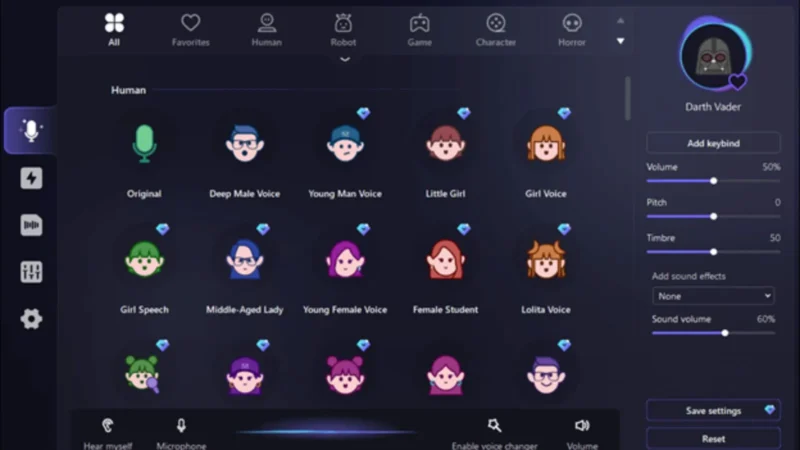
When looking for a voice changer that perfectly balances ease of use with professional features, EaseUS VoiceWave stands out, especially for gamers. This tool has been optimized for real-time performance and boasts an intuitive user interface, making it ideal for Valorant players who want to jump into the action quickly.
EaseUS VoiceWave ensures a lag-free experience, crucial for the fast pace of Valorant. It provides a plethora of fun voice filters, including options like Paimon, Orc, CS Terrorist and seamless male/female voice switching, allowing you to instantly change your persona mid-game. Crucially, it is compatible with over 200 popular online games and applications, ensuring you can use it beyond your Valorant sessions.
|
Feature |
Description |
|
Real-Time Morphing |
Instant voice transformation with low latency. |
|
Voice Library |
Access to various game-themed voices and realistic characters. |
|
Interface |
Simple controls and a highly intuitive UI perfect for beginners. |
|
Compatibility |
Widely compatible with Valorant, Discord and over 200 other online games. |
|
Pros |
Cons |
|
Seamless switching between male/female voices. |
Primarily compatible with Windows (10/11) only. |
|
Wide game and application compatibility. |
The free version has limited functionality compared to the premium. |
How to Use EaseUS VoiceWave in Valorant
Setting up EaseUS VoiceWave in Valorant is straightforward:
- Install and open the software on your PC. Go to Settings to configure your physical microphone and speakers.
- In Valorant, navigate to the Audio Settings.
- Change your input device (microphone) to "VoiceWave Microphone (EaseUS VoiceWave)".
- Select a voice filter in the VoiceWave application and your new voice will instantly transmit to your teammates.
2. Voicemod: The Best Overall for Streamers and Soundboards
Voicemod is arguably the most famous and feature-rich voice changer tool available today. It is a favorite among streamers and content creators due to its vast library of over 100 filters and robust soundboard functionality.
Voicemod allows for easy customizability of its voices and supports keybinding, enabling you to switch voices or drop sounds with a single button press during intense matches.
|
Feature |
Description |
|
Voice Library |
100+ voice filters, including robot, baby, alien and more. |
|
Soundboard |
Comprehensive soundboard support for key-mapped audio clips. |
|
Customization |
Extensive options to customize and fine-tune every voice filter. |
|
Pros |
Cons |
|
Excellent overall for games, streaming and comms apps. |
The free version limits the number of accessible voice filters daily. |
|
Vast access and highly customizable voice filters. |
Keymapping advanced features can be complex initially. |
3. NCH Voxal Voice Changer: The Powerful Customization Engine
NCH Voxal Voice Changer is one of the oldest and most established tools in the voice modification space. Its longevity means it offers a powerful engine for deep customization and a reliable, low-resource performance.
While its interface may feel dated compared to newer competitors like EaseUS VoiceWave and Voicemod, its strength lies in the depth of control it offers. It’s an excellent option for users who prioritize creating highly specific, unique voice profiles.
|
Feature |
Description |
|
Effect Stack |
Ability to layer multiple effects to create complex voices. |
|
Voice Filters |
Features around 40+ customizable voice options. |
|
Low Resource Use |
Not hard on system resources, making it reliable for gaming. |
|
Pros |
Cons |
|
Voice filters can be extensively customized and saved to a library. |
Interface is somewhat dated and less intuitive for new users. |
|
Highly effective for changing voice in streams and games. |
The full premium version is considered quite costly. |
4. MorphVOX: The Low-Latency, Pro-Level Tool
MorphVOX is known for its ultra-realistic voice effects and exceptionally low-latency performance. It is a premium choice often favored by professional YouTubers and streamers who need high-quality voice output for recorded content and live streams.
MorphVOX organizes its voices into categorized filters (male, female, fantasy, characters) and even allows you to change background sound effects to add immersion to your gameplay pranks. Its engine is designed to handle demanding audio processing without compromising voice quality.
|
Feature |
Description |
|
Voice Quality |
Known for ultra-realistic, high-quality voice morphing. |
|
Background Noise |
Ability to add tweakable background sound effects. |
|
Key Binding |
Supports custom key binding for instant voice/effect changes. |
|
Pros |
Cons |
|
Tweakable sound, voice and background environment effects. |
Can be one of the more expensive options for full access. |
|
Low latency makes it great for competitive online games. |
The free version does not offer extensive use or features. |
5. Clownfish Voice Changer: The Lightweight and Free Option
If you are looking for a simple, completely free and non-demanding tool for quick voice adjustments, Clownfish Voice Changer is the answer. Installed at the system level, it applies effects to any application that uses a microphone, including Valorant and all major comms apps.
Clownfish keeps things simple, offering just over 12 basic voice effects, such as Alien, Robot, Radio and Mutation. It lacks the advanced soundboard and customization features of its competitors but excels in being a simple, effective and entirely freeware solution.
|
Feature |
Description |
|
System Integration |
Works globally across all microphone-using applications. |
|
Voice Filters |
Offers about 12 core customizable effects. |
|
Freeware |
Completely free to use with no hidden costs. |
|
Pros |
Cons |
|
Completely free and usable for an unlimited time. |
Only offers a few basic voice filters and presets. |
|
Simple and effective user interface design. |
Not as feature-rich as premium or dedicated tools. |
The Bottom Line
A great voice changer can transform your Valorant experience, adding endless hours of fun and novelty to your communication. While all the listed tools offer excellent options for real-time voice modification, your ideal choice depends on your needs:
- For the Ultimate Fun: If you prioritize soundboard functionality and an enormous library of effects, Voicemod is hard to beat.
- For the Budget Gamer: If you just need a simple, free tool to change your voice on the fly, Clownfish Voice Changer is perfect.
- For the Beginner Gamer (Our Recommendation): If you are looking for a powerful, modern, yet beginner-friendly application optimized specifically for gaming with simple setup and low latency, EaseUS VoiceWave provides the most complete and accessible package for Valorant players today.